TikTok and Reels safe zone: where to put your text
Updated
The short answer: keep the top strip clear, a much taller strip at the bottom and a margin on each side. Meta spells it out for Reels ads: at least the top 14%, the bottom 35% and 6% on each side. TikTok doesn’t publish percentages, but it asks for the same thing: nothing important where buttons, the username or the description can show up. In this guide you’ll find the numbers with their source, a layout, a free 9:16 template and where to place each piece of text. If you cut clips from long videos for Instagram, also see how to make Reels from your long videos.
What the safe zone is
A vertical video plays full screen, but it doesn’t play clean. On top of it sit the account name, the description, the music, the like, comment and share buttons and, in ads, the call to action. The safe zone is the central area that none of those layers covers. Anything outside it may show up only partly, or not at all.
Meta’s numbers for Reels
The Reels ad video specs (checked October 20, 2026) recommend keeping text, logos and other key elements out of these areas:
| Zone | Space to keep clear | On a 1080×1920 video |
|---|---|---|
| Top | 14% of the height | about 270 pixels |
| Bottom | 35% of the height | about 670 pixels |
| Each side | 6% of the width | about 65 pixels |
The pixels are the percentage applied to a 1080×1920 video, rounded. The same page gives 9:16 as the aspect ratio.
These numbers are for ads, which carry more elements on top than a regular post. For your own Reels they work as a generous margin: if the text respects that zone, nothing will cover it.
Free 9:16 safe zone template
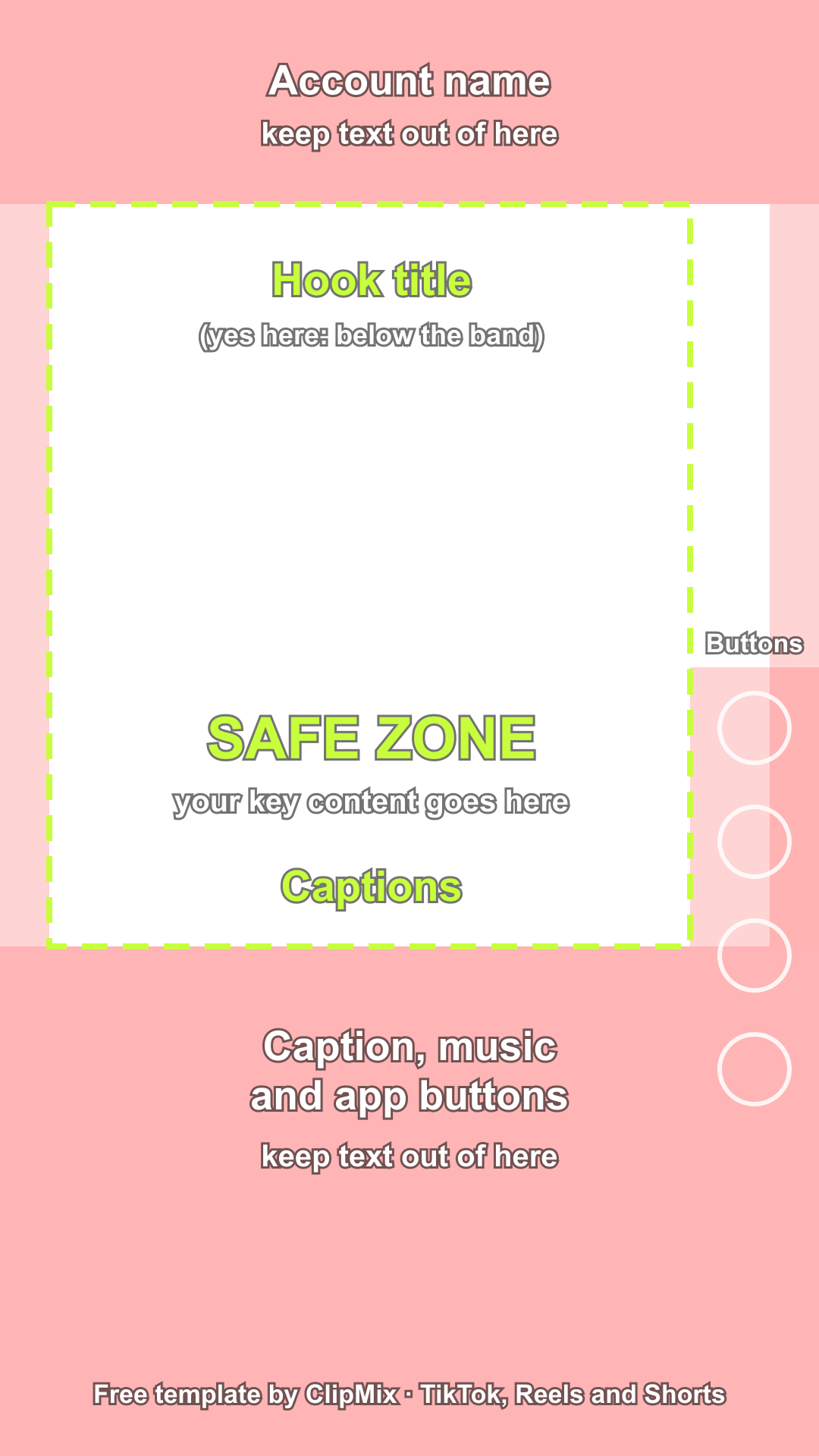
Want to see it instead of measuring it? We turned Meta’s numbers into a ready-to-use template: a transparent 1080×1920 PNG with the top, bottom and side strips marked. Drop it on top of your video as an overlay in any editor, line up your title and captions inside the clear area and hide the layer before you export. It works for TikTok, Reels and Shorts, since all three are 9:16.
Download the free safe zone template (PNG)
What TikTok says
TikTok’s help page on TopView ads (checked October 20, 2026) doesn’t give percentages: it explains that the safe zone depends on the length of the ad text and may not apply the same way on every device. What it does ask for is clear: don’t place text, logos or key messages where buttons, usernames or the ad text may appear, and avoid the top and bottom edges. It also says the in-feed safe zone is more restrictive than the full-screen one.
Since there’s no official number for TikTok, we don’t give one here. In practice, Meta’s margins keep you away from the bottom strip, but on the right you should leave more room than that 6%: that’s where TikTok’s buttons sit, from mid-height down.
The layout, top to bottom
Think of the vertical video as four bands:
- Top (first 14%): the account name and, in some cases, the feed tabs. No titles or logos.
- Upper middle: the best spot for a hook title. It’s seen right from the start and doesn’t compete with the face if the person is lower down.
- Middle: the face, or whatever matters in the shot.
- Bottom (last 35%): the description, the music and, on the right, the column of buttons. In an ad, no captions or key text; in a regular post, captions can go in the upper part of this strip, above the description.
Captions go between the face and the bottom strip, just below the chin. In an ad, above that 35%; in a regular post there’s a bit more room, because only the description and the music sit on top, but it’s worth checking on your phone.
Where to place each piece of text
- The hook title: at the top, but below the first strip. Stick it to the edge and the account name runs over it.
- Captions: below the face and away from the description. Not over the mouth and not pressed against the bottom edge.
- Your logo or brand: if you add one, inside the side margins; a corner right at the edge is exactly where the buttons land.
- Key details (a number, an address, a price): in the middle, never in the top or bottom strips.
Common mistakes
- Designing the video full screen on a computer and never checking it on a phone with the interface on top.
- Captions too low, level with the description: they’re readable in the editor preview and vanish in the feed.
- Long lines of text running edge to edge, crashing into the column of buttons on the right.
- Moving the text around in every clip. If you always put it in the same place, your followers know where to look.
How ClipMix does it
In ClipMix, captions sit centered in the lower part of the frame, with their bottom edge about 260 to 300 pixels from the bottom on a 1920-pixel-tall video (between 14% and 16%), depending on the template. That height can’t be changed in the editor. In a regular post it sits above the description, but inside the 35% Meta asks you to keep clear in ads: if you plan to run the clip as a Reels ad, keep that in mind. The hook title shows at the top for the first few seconds, and you can drag it to sit below the top strip. You check everything in the preview, offline, before exporting. If you want to dig deeper into caption style, see the guide on how to add subtitles on Android.
In short
- Meta recommends keeping the top 14%, the bottom 35% and 6% on each side clear.
- TikTok gives no numbers, but asks for the same: nothing key where buttons, the username or the description appear.
- Title in the upper middle; captions below the face and away from the description.
- Check every clip on your phone before posting it.