An Opus Clip alternative that edits on your Android
Opus Clip's Android app doesn't include an editor, according to its help center. ClipMix suggests every clip worth posting in your video and lets you review and polish each one on your phone, offline, before you export it, without using minutes. Your videos stay yours. Here's the comparison, with the source and date of every fact.
- 30 free min a month
- No sign-up
- Captions in 6 languages

Same idea,
a different way to work.
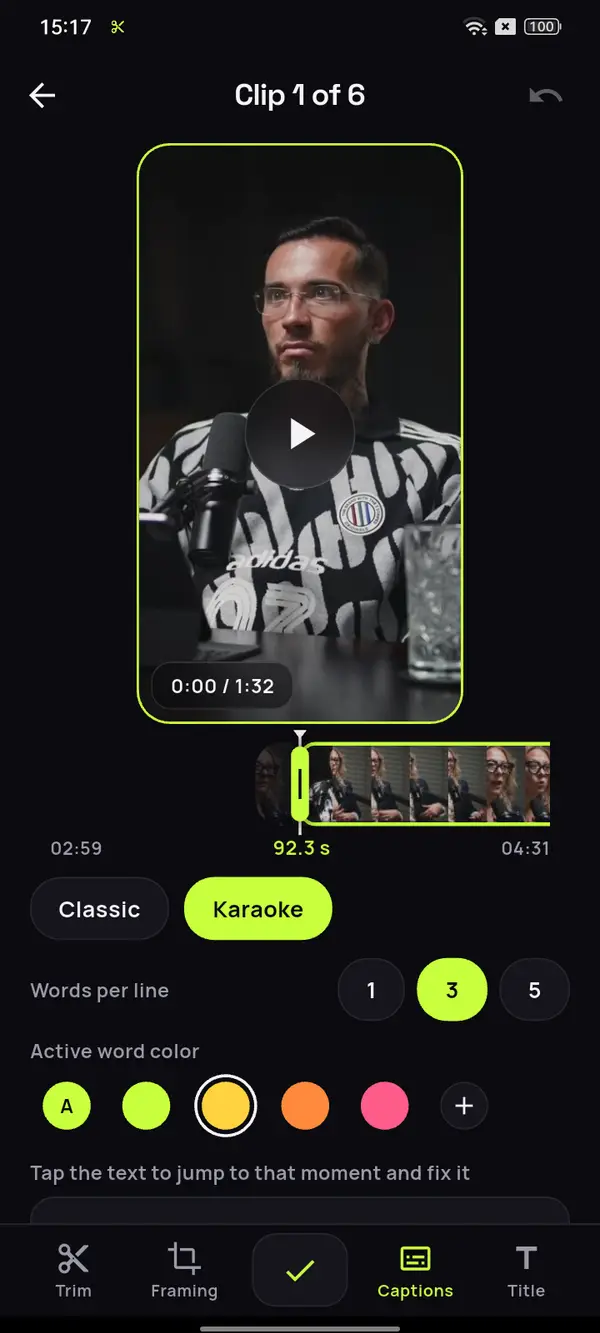
Review and polish before you export
Adjust the start and end by up to 10 seconds on each side, fix the caption text, change its style, the framing and the hook title. What you see in the preview is what gets exported.
An editor that works offline
Everything happens on the phone, offline and without going through a computer. See how face-tracking reframing works.
Exporting uses no minutes
Minutes are used when you analyze a video, not when you export or re-export your clips. Your videos stay yours; we never publish them or sell them.
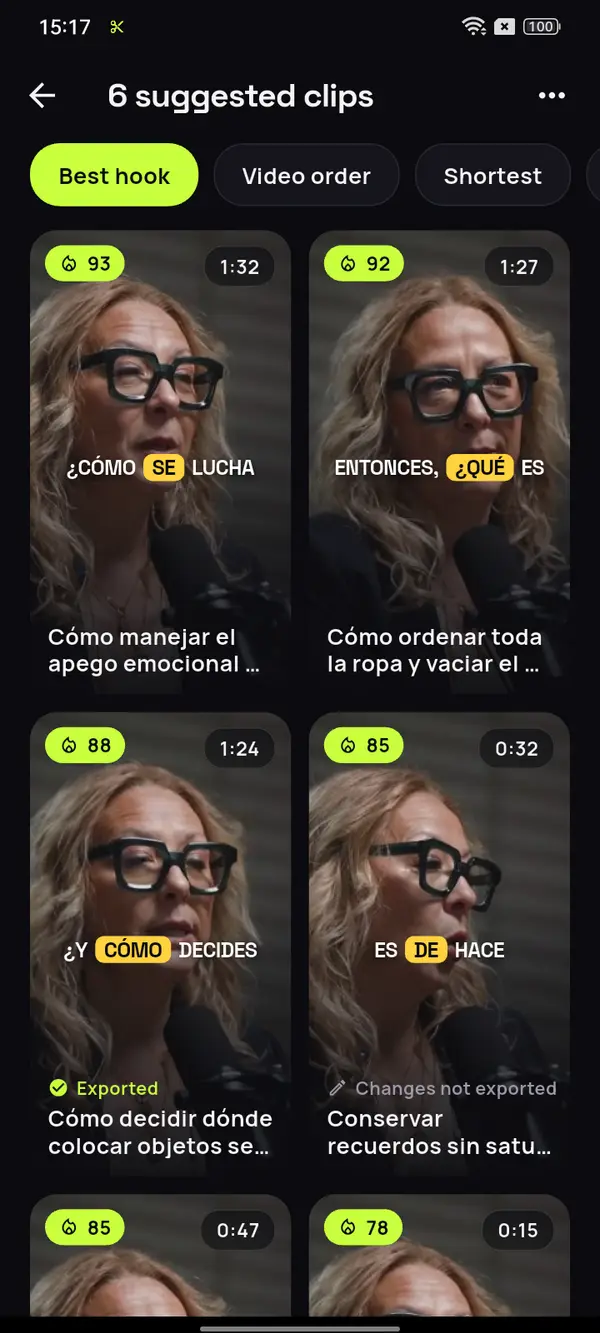
A podcast of an hour and twenty-five, in Spanish.
All its clips, no fixed number.
Pick the original file on your phone and ClipMix suggests every clip that makes sense on its own, cut at the end of a sentence, so you decide which ones to export.










12 clips ready to review
- Analyzing your video
- Picking the moments with a hook
- Getting your clips ready
Everything in its place
The gift you don't like
Drawers like a store
What “I have no time” really hides
Video: “Experta en Orden”, by Zoom Out Podcast, licensed under CC BY 3.0. Trimmed, reframed, captioned and translated. Zoom Out Podcast is not affiliated with ClipMix. Illustrative example with real moments from the original video.
How ClipMix works
in three steps.
Pick the video
The original file on your phone.

ClipMix suggests the clips
Every one worth posting, cut at the end of a sentence.
Polish and save
Adjust whatever you want offline and export to your gallery.
Which one is right for you?
Both pull clips out of a long video, but on Android the difference is what happens next. Opus Clip’s Android app doesn’t include an editor, according to its help center: you download or share the clip as it comes out and, to edit it, it sends you to a desktop browser.
With ClipMix you review every clip before exporting it: adjust the start and end, fix the captions and change the framing or the title, on your phone, offline and starting from the original file in your gallery. What you see in the preview is what gets exported, and exporting never uses minutes.
Why ClipMix on your Android
- Editor on your phone: polish every clip without going through a computer.
- Offline: the editor works without a connection.
- Every clip worth posting: no fixed number per video.
- Exporting uses no minutes: only the video you analyze counts.
| Aspect | ClipMix | Opus Clip |
|---|---|---|
| Where you use it | Android app. | Web and Android app (Android 12 or later, since June 2026, in 8 countries, including the US, the UK, Canada and Australia). |
| How you give it the video | You pick the original file on your phone; no links. | On Android, a YouTube link or a file from your phone. On the web, depending on the plan, other links too, like Google Drive, Vimeo or Zoom. |
| Editor on Android | Yes, offline. Start and end (±10 s), caption text and style, framing and title. | The Android app doesn't include an editor, not even the transcript editor; to edit, its help center points you to a desktop browser. |
| Review and polish before exporting | Yes. The editor's preview is what gets exported. | On Android you choose the length, the clipping mode, the format and the caption style before processing; afterwards, you download or share the clip. |
| Formats | 9:16, 1:1, 4:5 and 16:9, one per project. | 9:16, 1:1, 4:5 and 16:9 with automatic reframing; on the free plan, only 9:16. |
| Clips per video | Every clip worth posting, with no fixed number. | On Android you choose the length of the video and of the clips and the clipping mode. They don't publish the number of clips per video. |
| Privacy | We never publish or sell your videos; the video files are deleted from our servers as soon as you download the clip, or after 24 h. | Explained in its privacy policy. |
| Free plan | 30 free minutes a month. | 60 processing minutes a month, according to its help center. Its website also offers a 7-day trial of the Pro plan with 90 minutes. |
| Paid plans | Subscription or minute packs; you see the prices in the app. | Starter, $15/month (monthly billing only). Pro, $29/month billed monthly or $14.50/month billed yearly ($174/year). Business, custom pricing. In US dollars, according to its pricing page. |
| Watermark | Free clips are exported after an ad and carry a watermark; with a plan or pack, none do. | The free plan exports with a watermark, according to its pricing page and its help center. |
| Exporting | Never uses minutes. | They don't publish whether exporting uses credits. |
Data for Opus Clip checked on its public website on . It may have changed since then.
- Opus Clip Help Center, Android app · checked on 2026-10-21
- Opus Clip Help Center, plans and credits · checked on 2026-10-21
- Opus Clip, mobile app page · checked on 2026-10-21
- Opus Clip, pricing page · checked on 2026-10-21
- Opus Clip, home page and FAQ · checked on 2026-10-21
- Opus Clip, privacy policy · checked on 2026-10-21
Is ClipMix an Opus Clip clone?
No. They do a similar job, turning long videos into short clips, but ClipMix suggests every clip worth posting and lets you review and polish each one on your phone, offline, before exporting it. Here's how ClipMix works.
Can I review each clip before exporting it?
Yes. In the phone's editor you see the clip exactly as it will turn out and adjust the start and end, the caption text and style, the framing and the title. Opus Clip's Android app lets you download or share clips, but doesn't include an editor; to edit, its help center points you to a desktop browser.
Does ClipMix use my videos for anything else?
No. Your videos are yours alone: we never publish them or sell them, and the video files used to build each clip are deleted from our servers when you download it, or after 24 hours. All the details are in our privacy policy.
Can I use ClipMix on my computer?
No. ClipMix is an app for your Android phone, built to do everything from the phone: pick the video, review every clip and save it to your gallery.
Can I paste a YouTube link?
No, and that's on purpose: ClipMix works with the original file on your phone, the one you recorded or exported, not with a copy downloaded from the internet.
How much does ClipMix cost?
You get 30 free minutes a month. Free clips are exported after an ad and carry a watermark; with a plan or pack, none do. Pricing and plans.
Where does the data in the table come from?
From Opus Clip's public website and help center, with the date we checked each one and a link to every source. If they don't publish a fact, we say so.
What if Opus Clip's data has changed?
It can happen. Every fact carries the date we checked it and its source, and we update the table when it changes.
Try ClipMix
with your latest video.
Download ClipMix and compare for yourself. 30 free minutes a month.
Get it free